
Key Takeaways
- Webflow builds custom-looking business sites, and you never need to write code.
- Ghost gives writers a clean editor, with newsletters and memberships built in.
- Webflow charges per site, and Ghost charges by audience size.
- Webflow needs outside tools for email and paid readers, adding monthly fees.
- Run Ghost for your blog and Webflow for your business site together.
Every website runs on a platform that controls its look and income. Webflow builds polished business sites, while Ghost runs blogs and paid newsletters. Both are popular, so Webflow vs Ghost is a common debate.
In this battle, your needs decide the right choice. Pick Webflow for a custom-designed business site with no coding. On the contrary, pick Ghost to write, email subscribers, and charge for your content. Each solves a different problem.
This decision matters, and a few words cannot settle it. This guide gives you every detail you need to pick the better fit between Ghost and Webflow.
What Is Webflow?
I would be surprised if you told me Webflow is a name you've never heard of. However, Webflow is a website builder where you design pages visually, like arranging shapes on a canvas. You see changes as you make them, so you never need to write code.
Webflow also hosts your site and includes a built-in content system for blogs and listings. Businesses, agencies, and portfolio owners use it to launch polished sites without hiring a developer.
Advantages & Limitations of Webflow
Advantages
- Full design freedom: Place every button, image, and heading exactly where you want it.
- Eye-catching movement: Add scroll effects and hover animations that keep visitors looking.
- Hosting included: You get no separate hosting bill and no server to manage.
- Agency-ready: A Webflow design service can build a custom site around your brand, and you can still edit the text yourself afterward.
- Quick launch: Webflow For Startup teams can publish a polished landing page in days and update it later without waiting on a developer.
Limitations
- Slower start: The first week of learning feels busy if you have never built a site.
- Extra tools for newsletters: Email and paid memberships need outside apps, and each one adds a monthly fee.
- Rising costs: Bills grow as you add pages, blog posts, and visitors.
- Less comfortable for writing: Long articles take more clicks than they do in a writing-first tool.
What Is Ghost?
This Ghost is not something that comes in the dark to scare you. Well, this one is a publishing platform built for writers. You type your posts in a clean editor, press publish, and your readers see them on a fast, simple site that looks good on phones.
Launched in 2013 as an open-source project, Ghost has email newsletters and paid memberships built in. Bloggers, journalists, and independent creators use it to earn money from their readers directly.
Advantages & Limitations of Ghost
Advantages
- Newsletters built in: Write a post once and send it to your subscribers by email in the same step.
- Paid memberships ready: Charge readers monthly or yearly without adding a separate membership tool.
- Distraction-free writing: The editor stays clean, so you can draft and schedule posts quickly.
- Fast pages: Readers wait less, and that keeps them on your site longer.
- Full ownership: You keep your content and your subscriber list, and you can move them elsewhere.
Limitations
- Fixed look: Your site follows a theme, so unusual layouts and custom animations are hard to build.
- Simpler pages: Ghost works best for posts and basic pages, not complex business sites.
- Setup help for self-hosting: Running Ghost on your own server needs technical skills or a paid helper.
- Growing fees: The managed plan costs more as your subscriber count rises.
Webflow vs Ghost: Key Differences at a Glance
Here is the full comparison in one view. Webflow leads on design and custom layouts, while Ghost leads on writing, email, and paid memberships. Use this table for a quick check before you read on.
Webflow vs Ghost: Feature-by-Feature Comparison
Both platforms build good websites, but they handle design, writing, email, and growth very differently. Here are the nine points that matter most, with a short, plain answer on each.
Core Purpose and Platform Focus
A company site with a blog on the side? That is the job Webflow was made for. It handles home pages, service pages, and portfolios, and the blog stays one small part.
Writers and media teams land on Ghost for the opposite reason. Articles, an email list, and paying readers sit at the center, and a simple homepage ties everything together.
Editor Experience and Learning Curve
Ghost opens like a blank page. Type, add an image with one click, and publish in minutes. A first-time user can post a full article on day one.
Expect a steeper start in Webflow. You drag, drop, and style each piece like a design studio, and most beginners need a week or two of practice before it feels natural.
- Ghost teams: Invite writers and editors, give each a role, and schedule posts ahead.
- Webflow teams: Editors change text and images without touching the design.
Design Control and Customization
Want a layout nobody else has? Webflow lets you move a button by a few pixels, change fonts, set spacing, and build every section the way your brand looks.
Ready-made themes keep Ghost simple. Pick one, add your logo and colors, and the site looks clean within an hour. Bigger changes need a developer who knows Ghost themes.
Brands that want a one-of-a-kind look often hire a Web Design service to build the Webflow site once. After launch, your team edits text and images without help.
Interactions, Animations, and Front-End Flexibility
Scroll effects and hover animations come built into Webflow. A heading can slide in as visitors scroll, and a card can lift on hover, all without code.
Pages stay light and quick in Ghost. Basic effects come with the theme, while custom scroll animations need a developer. Most blogs never miss them, since readers come for the words.
Designers who weigh Framer or Webflow for motion will find both animate well. Webflow adds a more mature blog system, which helps once your content grows.
Content Modeling and CMS Structure
Job listings, team profiles, case studies, and blog posts can all live on one Webflow site. Each type gets its own fields and layout, so nothing looks squeezed together.
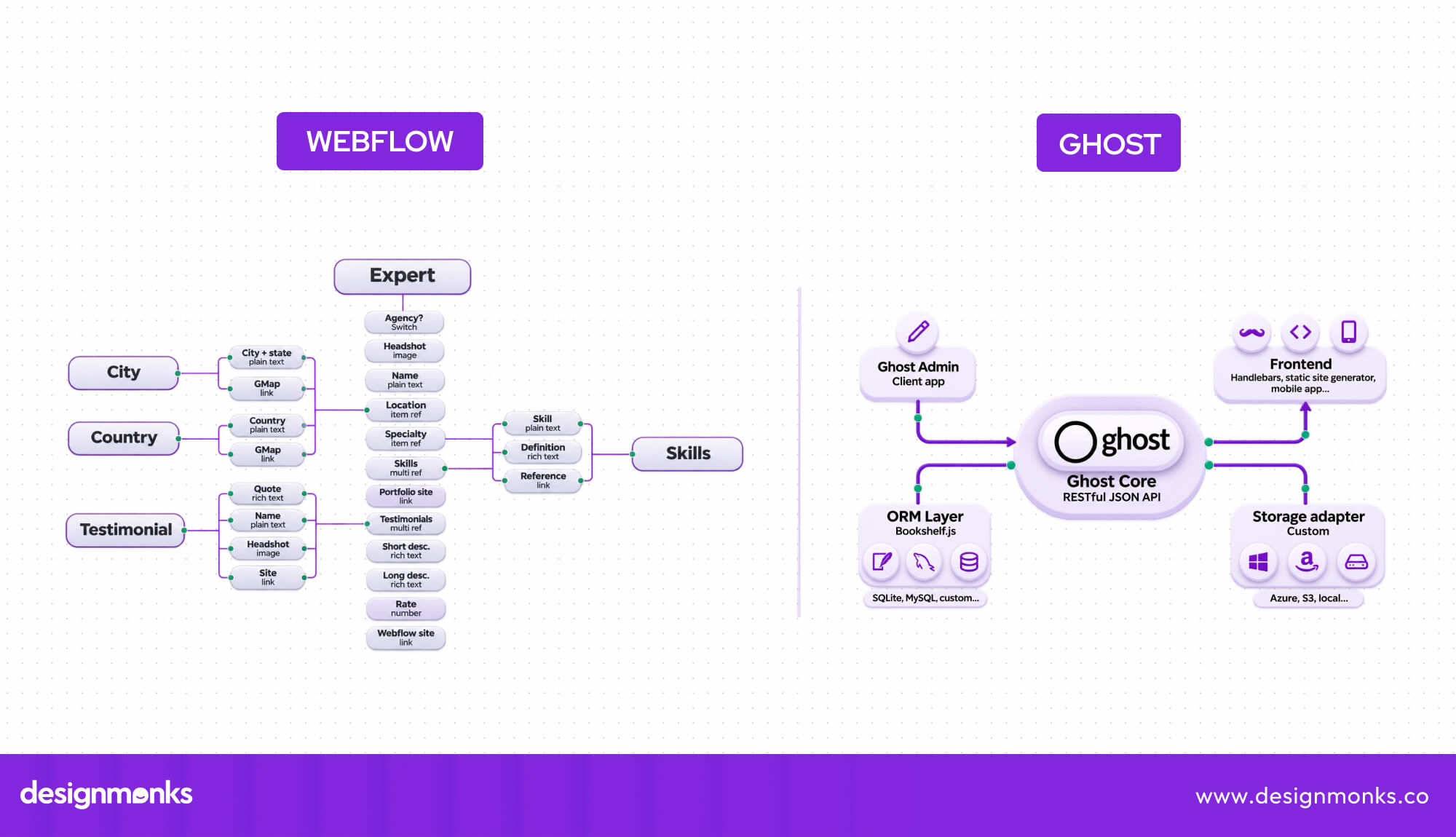
Posts and pages are all Ghost offers, and that covers most blogs and magazines. Tags group your articles, though extra content types like job listings need workarounds.
Still on an old site? A Wordpress To Webflow migration service can carry your posts and categories over, so you keep your articles and rebuild only the look.
Newsletters, Memberships, and Paid Subscriptions
Write a post, send it to your list, and charge readers monthly or yearly. Ghost does all of it from one dashboard, with no extra apps to set up.
No newsletter sender comes with Webflow. You connect outside apps, and each one adds a monthly bill and a setup task before your first paid reader signs up.
- Ghost: Free and paid tiers, with payments handled through Stripe.
- Webflow: Mailchimp for email, Memberstack for paid access, and Zapier to link them.
SEO Controls and Technical Setup
Every page in Webflow lets you edit the title, description, web address, image text, and redirects. You can also add extra code that helps Google read your content.
Beginners get the essentials done automatically in Ghost. It builds a sitemap, adds social sharing cards, and lets you edit each post’s title and description, so setup stays quick.
Site Speed and Core Web Vitals
Google measures how fast your page appears and how steady it feels while loading. These checks are called Core Web Vitals, and a slow site can lose visitors.
Light code gives Ghost a quick start on every page. Webflow sites also load fast when you keep images small and limit heavy animations, so a little care goes far.
Integrations and Third-Party Tool Dependency
Most publishers need few add-ons, because email and payments already sit inside Ghost. For the rest, Zapier and Ghost’s own integrations list connect many popular tools.
Plan for a few extra logins and monthly fees on Webflow. Email, paid memberships, and booking usually come from add-ons, and each one needs its own setup.
- Typical Ghost setup: Ghost, Stripe, and Google Analytics.
- Typical Webflow setup: Webflow, Mailchimp, Memberstack, Zapier, and Google Analytics.
Webflow vs Ghost: Pricing Comparison
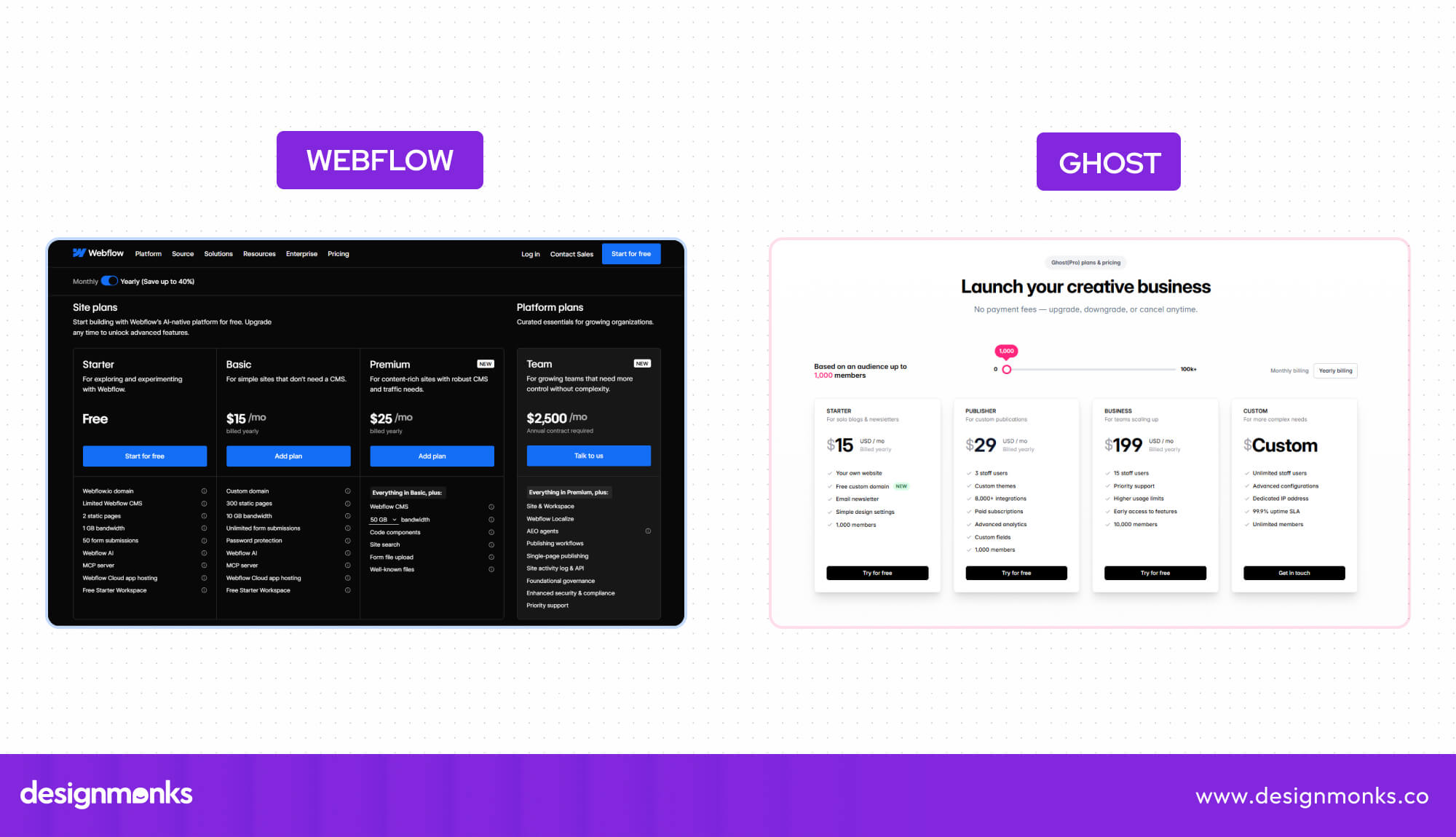
Webflow charges per website, while Ghost charges by audience size. Webflow’s Basic plan starts at $15 a month and Premium at $25 on yearly billing. Ghost’s Publisher plan starts at $29 a month and rises as your subscriber list grows.
Extra cost factors to plan for:
- Webflow team seats: Added team members need a Workspace plan, and Core costs $19 a month on yearly billing.
- Webflow add-ons: Email and paid access come from tools like Mailchimp and Memberstack, and each one has its own monthly fee.
- Webflow price update: Client sites in Freelancer or Agency Workspaces move to the new prices at their first renewal on or after November 16, 2026.
- Agency fees: A design agency pricing model often adds a one-time build fee and a monthly care fee on top of these plans, so ask for both numbers.
- Ghost audience growth: Publisher costs about $75 a month at 5,000 members, so the bill climbs as your list grows.
- Ghost payment fees: Stripe keeps a small fee from every paid subscription.
- Self-hosted Ghost: Server, email delivery, and backups add up to roughly $12 a month, plus your own time.
Can You Use Webflow and Ghost Together?
Yes, you can run Ghost and Webflow side by side. Many teams build their business site in Webflow and keep their blog and newsletter in Ghost, then link the two together.
The easiest setup uses a subdomain. Your Webflow site lives at yourbrand.com, and your Ghost blog lives at blog.yourbrand.com. Add a menu link on each side, and visitors move between them smoothly.
You get the best of both. Webflow handles custom landing pages and animations. Ghost handles articles, email, and paid readers without extra apps, which can cost less than adding newsletter tools to Webflow.
Expect two trade-offs. You will pay two bills and manage two logins. Matching logos, colors, and fonts keep the blog looking like part of your site. A yourbrand.com/blog address needs Ghost’s Business plan and a $50 monthly add-on.
Webflow vs Ghost: Which One Should You Choose?
The right pick depends on what your website must do every day. Webflow suits sites that sell a service, while Ghost suits sites that sell words. Compare your daily tasks with the two profiles below.
Who Should Use Webflow
Webflow suits owners who want a custom look and a company site. Web design and web development are not the same thing, but Webflow handles both without code.
- Agencies, consultants, and freelancers who need a portfolio that wins clients.
- Startup and SaaS teams that update landing pages often.
- Businesses that want animations and layouts no template offers.
- Owners who treat the blog as a small extra.
Who Should Use Ghost
In the Ghost vs Webflow decision, Ghost wins for writers who publish weekly, email readers, and earn from subscriptions. The setup is quick, and the tools sit in one place.
- Independent writers and journalists building a paid newsletter.
- Media brands and magazines with several editors.
- Creators who want the platform to take no cut on paid plans (Stripe still charges its own payment fee).
- Beginners who want to publish on day one.
FAQs
Is Webflow still popular?
Yes, Webflow remains popular. Agencies, startups, and small businesses still use it to build custom sites without code, and the company keeps adding new features and plans, so it stays relevant.
Is Ghost better than Webflow for blogging?
Yes, for most bloggers. Ghost gives you a clean writing page, built-in email, and paid memberships. Webflow offers more design freedom, but long articles take more clicks and newsletters need extra tools.
What are the best Ghost CMS alternatives?
Substack, Beehiiv, and WordPress are the best Ghost alternatives. Substack suits simple paid newsletters, Beehiiv adds subscriber growth tools, and WordPress gives the most design and plugin choices for full websites.
Is Ghost better than Webflow for SEO?
Neither wins outright. Webflow gives deeper controls like redirects, page titles, and image text. Ghost handles the basics automatically and loads fast. Quality content and site speed matter more than the platform you pick.
Final Takeaway on Webflow vs Ghost
Webflow and Ghost solve very different problems. Webflow gives you a custom-looking business site with no code, while Ghost gives you a simple home for articles, email, and paid readers. Match the platform to your main goal, and your site will grow without extra headaches.
Want a polished Webflow site without paying agency prices? Contact Design Monks today for affordable Webflow service. The team builds a site around your brand, so you launch faster and can edit it yourself afterward.