
.svg)


Key Takeaways
- UI design focuses on visual aesthetics, layout, colors, and interactive elements.
- UX design ensures smooth, intuitive, and satisfying user experiences throughout.
- UI and UX collaborate, with UX shaping structure and UI refining visuals.
- UI/UX tools differ: UI for visuals, UX for research and testing.
- UI/UX careers suit creativity for UI, analytical thinking for UX.
UI vs. UX Design, what are the differences? This might be the first question when you enter Into a world where every pixel and interaction counts.
UI and UX are like two siblings in the field of digital design that designers use to produce different digital products like apps, websites, software, etc. Here, UI design focuses on the visual aesthetics of the product whereas UX design completely focuses on how comfortably users will interact with it.
So, when we explore a digital product, the way it looks depends on how its UI designer works and the way we use it depends on how the UX designers worked on it.
However, there’s a lot to learn about UI vs. UX Design, especially if you are a beginner. So, let’s spend a few minutes on this blog and I promise, it will clear all the confusion about this fact.
What Is UI Design?
UI design’s full form is User Interface design. It’s an essential aspect of digital product development that solely focuses on creating visually appealing, intuitive, and interactive interfaces for users to interact with.
For that, UI designers use suitable elements like buttons, icons, menus, forms, typography, color schemes, and layout. These are the basic elements that every interface should include.
As an example, we can talk about the UI of Instagram. If you are a user, you must notice that Instagram’s UI design comes with a clean and minimalistic interface. Here, the core focus is on visual content.
The app is built with a simple tab-based navigation system that lets you switch between the home feed, search, camera, notifications, and profile sections seamlessly. Also, it has bold icons and vibrant colors that nicely enhance the overall user experience.
So, the UI design determines the appearance of the app or other digital product in a way that must be visually appealing, interactive, and efficient to use.
What Is UX Design?
User Experience (UX) design is a multifaceted discipline that mainly focuses on creating products, services, or systems with meaningful and satisfying user experiences.
This process surrounds different factors, including usability, accessibility, aesthetics, pleasure, and efficiency. However, the ultimate goal is to meet user needs and enhance overall user satisfaction.
The core elements of UX Design are different from that of UI design. For this section, the entire process and elements are a little more complicated.
The process starts with proper user research and then goes through other must-have steps like a User persona, creating IA (Information Architecture), Wireframing, Prototyping, UI design, User texting, and finally implementation.
As we see, UI design is a part of UX design’s entire process. Here, the UX designers’ responsibility is to cover the entire user experience along with the visuals of the user interface.
For example, let’s think about the UX of Google Maps. Here, the user centric design prioritizes usability and accessibility so that users can navigate both familiar and unfamiliar locations.
The app’s intuitive interface lets us search for locations, get directions, and explore nearby places of interest. It also integrates real-time traffic updates, public transit information, and offline maps to provide a seamless experience for different use cases.
So, along with focusing on visual aesthetics like UI design, UX design prioritizes user needs, satisfaction, and efficiency. This is the main point where these two differ.
How UI and UX Work Together in a Real Project
UI and UX move side by side in every product, but they focus on different stages. UI is how it looks, UX is how it works, so the project starts with UX to define the structure and continues with UI to shape the final visuals. When both flow together smoothly, the product becomes usable, clear, and enjoyable.
The UX design process begins with understanding user needs, mapping journeys, planning the logic, and outlining screens. After this foundation is ready, the UX workflow vs UI process connects, and UI brings the experience to life with typography, spacing, layout, and other UI design elements. This ensures the product not only works correctly but also feels polished and intuitive.
A strong project blends both sides continuously. UX validates ideas through research and testing, while UI refines every interaction. This collaboration keeps the product functional, consistent, and aesthetically aligned with user expectations.
How they support each other:
- UX guides the structure, flow, and problem-solving direction for all screens.
- UI polishes layouts with visual balance, clarity, and accessible styling.
- UX ensures logic works; UI ensures interaction feels smooth and intuitive.
UI vs. UX Design: What’s the Difference
Now, let’s come to the point of UI vs UX design. As you learn about what these two design types are, you must get a basic idea of their differences. However, there are some facts where these two design sections share the core differences.
To understand how they differ, you must learn the facts. Let’s check them out:

Work Basics
In the world of design, a UI designer is like a visual storyteller. Their main job is to make things look good! They’re the ones who create beautiful layouts, pick the perfect colors, choose the right fonts, and design those shiny buttons that users find easy to notice.
However, a UX designer is like a master problem solver. Their task is to ensure that every part of the user’s journey is smooth sailing. They dig deeper to learn how people interact with a product and if they face any issues with it.
They figure out what users may need, and how they’ll use it, and then create the best possible experience that makes users feel better while using the product. For that purpose, UX designers conduct different strategies before and after designing the product.
Indeed, covering the visuals is a part of the entire UX design process.
Responsibilities
When we talk about UI vs. UX Design, the responsibilities of these two professions must get the focus. For sure, the responsibility of a UI designer is not similar to the one of a UX designer. As their work basics are different, they get different sets of responsibilities.
Generally, a UI designer’s core responsibility is to create an aesthetically appealing interface. Their duty is to choose the right color schemes, layouts, typographies, and iconographies. UI designers simply make sure that the elements suit well on the app or website and that users find it comfortable to look at.
On the other hand, a UX designer’s core duty is to ensure that the end users will find the product they design comfortable to use. For that, they have to conduct proper user research, create suitable user personas, design user flows, and build wireframes and prototypes to improve the user experience.
The UX designers’ responsibility is to design the product in a way, that makes it intuitive and easy to use. Also, they need to solve real user problems and test continuously to detect and fix probable issues.
So, the responsibility of the UI designers is solely on the visual aesthetics while that’s on user experience along with the visuals for the UX designers.
Design Strategies
When it comes to design strategies, UI vs. UX Design also gets a point. Their work strategies have different steps they follow to complete projects.

Generally, UI designers follow the steps below:
- Research and Analysis: They first understand the brand, target audience, and competition.
- Wireframing: Next, they create basic layouts and structures without visual design.
- Visual Design: In this step, they create the visual design with colors, typography, and imagery for wireframes.
- Prototyping: At this point, their task is to build interactive models for testing usability.
- Implementation: When the design is ready to use, they work closely with developers to bring designs to life.
Now, let’s come to the UX designer’s work strategies. Here are the steps that they follow:
- Research Phase: They start with gathering insights through user interviews, surveys, and analytics.
- Analysis and Synthesis: Next, they make sense of research data to identify user pain points. At this phase, they build their hypothesis too.
- Create Personas and Scenarios: They build fictional characters and scenarios based on research that they will think of as the end users.
- Wireframing and Information Architecture: Based on the outcomes of the previous steps, they map out user flows and content hierarchy.
- Prototyping: This phase is for building interactive prototypes for testing and validation.
- UI Design: As I mentioned earlier, UI design is a part of UX design and after making the prototype, UX designers cover the visuals performing the role of UI designers.
- Usability Testing: Next, they observe how users interact with prototypes and make improvements.
- Iteration: The final task is an uncertain process where they keep refining designs based on feedback for optimal user experience.
As we see, the working strategies are completely different for both sections. Initially, this is where the biggest difference lies between UI and UX design.
Goals and Focus
UI and UX designers have different goals and focus on work, not just the strategies and responsibilities. Because of their different goals, all their work strategies are categorized accordingly.
Generally, UI designers focus on the look and feel of a digital product. To understand it even more clearly, let’s think of the design of a weather app. UI design simply covers how the app appears on your screen.
The designer will determine the colors, buttons, icons, and overall visual elements. It’s like designing a stylish outfit for your app. UI designers are like visual artists who make sure that everything is not just pretty but also user-friendly.
UX design, on the other hand, is all about the user’s journey through the app or website. Going back to our weather app, UX design thinks about how easy it is for a user to check the weather in their city, how they navigate from screen to screen, and whether they get frustrated or delighted along the way.
So, UI designer’s goals and focus are solely on the visual part whereas UX designers’ goals and focus are on the way how users will interact with it more comfortably.
Required Skill
For skill and requirement, the UI and UX designs’ needs are different just as their responsibilities, goals, and strategies do.
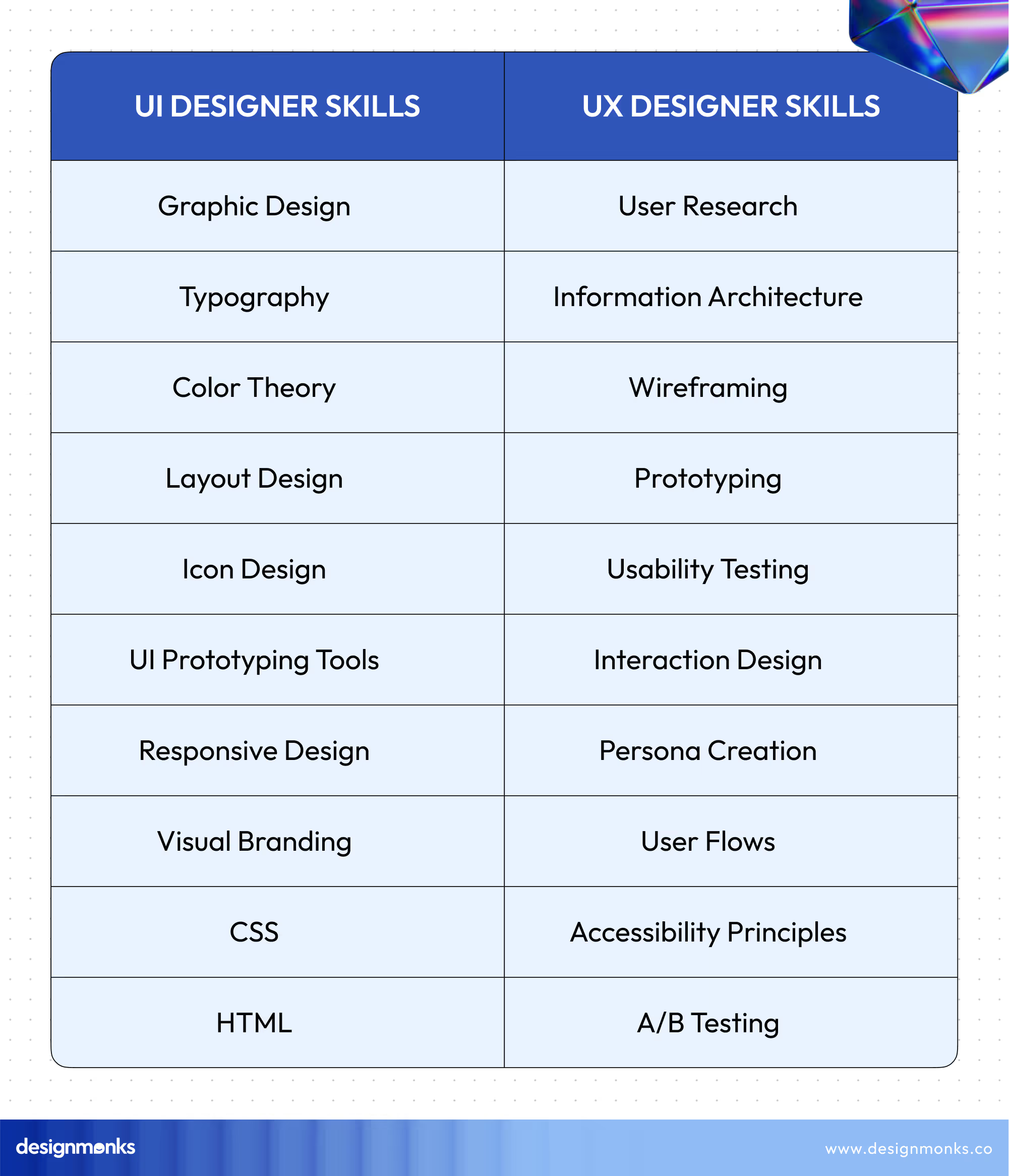
To be a UI designer, you’ll want to have a good eye for design. That means you need to understand color theory, typography like fancy words for fonts, and how to create visually appealing layouts.
Tools like Adobe XD, Figma, or Sketch are popular among UI designers. So, UI designers need to have great expertise in using all those tools. Besides, they should learn how to implement the elements to create an eye-soothing design.
To be a UX designer, you need to learn how to put yourself in the user’s shoes. Empathy is key in this case. You should learn how to create wireframes and prototypes to test how users interact with the product.
Skilled UX designers know how to use tools like Axure RP, Balsamiq, Adobe XD, etc. Yes, These tools are handy for both UI and UX. So, learning these tools is mandatory for UX designers too.
Besides, there are particular wireframing and prototyping tools you should learn to use as well. Essentially, conducting the user research process, which is the first step of UX design, is a pretty complicated process. To be a UX designer, learning this process is mandatory as well.
Job Opportunities and Salaries
As a UI designer, you can get different job opportunities like UI Designer, Visual Designer, or Graphic Designer. Companies around the world are always looking for talented UI designers to make their products visually appealing.
Salaries for UI designers can vary based on location and experience. In the US, entry-level UI designers might earn around $50,000 to $70,000 per year, while senior UI designers with years of experience could reach $100,000 or more.
As for UX design, you could land roles like UX Designer, Interaction Designer, or Product Designer. The demand for UX designers is booming because every company wants happy users! If you compare it with the UI designer, I must say that the job opportunities are huge in the UX field.
However, their salaries are also attractive. Junior UX designers might start around $60,000 to $80,000 annually in the US, while seasoned UX designers could command $100,000 to $150,000 or beyond.
So, we get tons of differences in UI vs. UX Design. From the component of tasks, job responsibilities, and goals, to the job opportunities and salaries, these two professionals have differences all over the section.
Similarities Between UI and UX Design
UI and UX are completely two different sectors with a different focus and goals. According to a blog on UserTesting,
‘There is no difference between UX and UI design because they are two things that aren’t comparable to each other.’
Craig Morrison, Associate Creative Director at Truvani
However, these two design siblings might have distinct roles, but they also share a common ground that makes them a powerful duo in creating fantastic digital experiences. They share some similarities that, indeed, introduce a new and hybrid section, UI/UX design.
Well, we’ll learn about the details of UX/UI design. But first, learn where these two sections share the similarities:
User-Centered Approach
UI design might focus on the visual elements, but it’s still deeply rooted in the user’s needs. While choosing color, buttons, and other elements, they make sure that users feel comfortable and familiar with what they see.
On the UX side, the entire discipline revolves around the user. Every decision, from the layout of a website to the placement of a menu, is made with the user in mind. Eventually, they conduct user research to understand behaviors and preferences, ensuring that the final product is a joy to use.
Collaboration
Both UX and UI designers need to collaborate closely with developers, team members, and even one another. UI designers bring the visual aspects to life based on the wireframes and user flows created by the UX team. Also, UX designers collaborate with UI designers to translate research findings and user needs into actionable design elements.
This collaboration is a must-have for the expected outcome of the final product. Additionally, both of them work with developers to create prototypes and iterate based on feedback.
Research and Analysis
Believe it or not, UI designers also need to research even though that’s not the extended level like the UX unit. They analyze trends in design, study user interactions with similar products, and gather feedback on prototypes.
A short research helps the UI unit make informed decisions about color schemes, button sizes, and overall visual hierarchy.
However, research is the bread and butter of UX design. From user interviews to usability tests, UX designers are always digging for insights. They analyze data to understand pain points and opportunities for improvement. Ultimately, they work in a research-driven approach from the beginning to the end of the project.
Prototyping and Testing
Prototyping is an unavoidable step for both UI and UX design. Designers create interactive mockups to demonstrate how the product will look and behave. These prototypes are then tested to gather feedback.
Both UI and UX designers need to build prototypes to get the final outlook of the product. Here, the prototyping approach is more prioritized in the case of UX design. They create wireframes and interactive prototypes to simulate the user experience.
However, the prototypes of both designs are tested with real users to identify issues with the visuals and user experience. This process lets designers refine the product until it reaches its best form.
Emphasis on Accessibility
Accessibility is not just a buzzword in UI design, it’s a must just like in UX design. UI designers ensure that visual elements are easy to navigate for the users. Their attention to accessibility improves the usability of the product.
UX designers also prioritize accessibility in their designs. They consider how users with different abilities will interact with the product and design accordingly. So, designers of both sections aim to improve and create a design that has better accessibility.
UI Tools vs UX Tools
UI and UX require different sets of tools because UI is how it looks, and UX is how it works. For different stages, designers and UI/UX service providers use different tools. Each stage uses specific platforms that support the UX workflow vs the UI process effectively.
UI Tools (For Visual Design & Interface Creation)
These tools help designers craft layouts, colors, components, and interactions.
- Figma: Ideal for interface layouts, components, and shared design systems.
- Adobe XD: Clean interface design tool with smooth prototyping options.
- Sketch: Popular for macOS-based UI design and reusable components.
- Framer: Useful for high-fidelity prototypes and visually polished interfaces.
UX Tools (For Research, Mapping & Testing)
These tools support early discovery, user analysis, and flow planning.
- Miro: Great for user flows, brainstorming, and journey mapping.
- Maze: Fast, data-driven usability testing with measurable insights.
- Optimal Workshop: Supports card sorting, IA testing, and navigation research.
- Whimsical: Useful for low-fidelity wireframes and clear process diagrams.
Why Using Both Matters
- UX tools shape structure, logic, research, and early validation.
- UI tools refine screens, components, visuals, and interactive details.
- Combining both ensures a complete, smooth, and user-centered digital product.
What Does It Mean By UI/UX Designer?
If you have a habit of exploring the job market, the position name for the UI/UX designer must be familiar to you. You have already learned UI and UX design. Now, you might ask about what’s this UI/UX design, right?

Well, as you just see, UI and UX design have some similarities, many companies expect the designer to have expertise in both sections. Generally, both roles of UI and UX designers are essential for most companies. That’s why they look for an individual who is good at both.
This job can be comparatively easier for a skilled UX designer, but not for a skilled UI designer. It’s because almost all UX designers are more or less familiar with the components of UI design. All they need is just a good eye to choose components properly like a UI designer.
However, for a UI designer, starting working as a UI/UX designer can be difficult and sometimes, impossible, unless they learn the technical strategies a UX designer follows.
In the World job market, the demand for a UIUX design is simply higher than for a UI or UX designer. That’s why it’s always suggested to learn both taking a little bit of time and doing both to gain more experience.
UI vs UX Career Paths: Which One Should You Choose?
UI and UX careers follow different mindsets. UI focuses on visuals, while UX focuses on problem-solving and user behavior. Your natural strengths help decide which path fits you best.
If you love colors, layouts, and crafting clean interfaces, UI is a great choice. UI designers shape how a digital product looks and feels through components, typography, and visual systems.
If you enjoy understanding users, mapping journeys, and fixing usability issues, UX might suit you more. UX designers plan how a product works by researching, wireframing, and testing ideas.
Choose UI if you’re visually creative. Choose UX if you think analytically and enjoy structuring experiences. Both paths lead to strong careers in the design industry.
FAQs
Is it better to be a UX or UI designer?
Whether it’s better to be a UX or UI designer depends on your skill, interest, and experience. Actually, both are good and UI design is less complicated than UX design. Also, UX designers are in higher demand than UI designers. So, choose according to your needs, skills, and interests.
Is UI harder than UX?
No, UI is not harder than UX, instead, UX is harder than UI. It’s because UI only focuses on visual aesthetics whereas UX is a round-up task for user experience and UI can be a part of their task.
Who is paid more UI or UX?
The earning potential for UI and UX designers depends on their skill, professional tag, company policies, place, and demands. Generally, UX designers are paid more than UI designers.

Wrapping Up
So, what do you think about the fact of UI vs.UX design? Even though they have a lot of differences as UI is actually a part of UX design, they are equally important when it comes to producing a digital product.
Learning UI design can be easier than UX design even though learning UX can provide more job opportunities and a higher salary range. In most cases, you’ll learn UI when learning UX design. However, if you manage to be a skilled designer, no matter if it’s UI or UX, you’ll shine no matter where you are.
So, explore the skill set and requirements that decide what tag you love to use beside your name in the future.
Best wishes for you.


.avif)
.avif)
.avif)
.avif)


.avif)
.avif)
.avif)
.avif)







.avif)




