.svg)


Key Takeaways
- Icon Monks comes with 70,000+ free icons across 31 categories to explore.
- You can choose from six icon weights to match your design style.
- Icon downloading is available in SVG, PDF, PNG, and WebP formats.
- You can use MIT-licensed icons freely in personal and commercial projects.
- Icon Monks lets you integrate icons into React, Vue, Flutter, and more.
What could you create if 70,000+ icons were just a few clicks away? From a clean dashboard to a polished mobile app, the right visual details can make your design clearer and more complete. Now, finding them doesn't have to be a hassle.
Meet Icon Monks, a new free icon library launched by Design Monks. It brings together thousands of icons across 31 categories, six visual weights, and multiple download formats. This makes it a useful resource for both designers and developers.
But there's more to explore than a big collection. From choosing the right style to adding icons to your workflow, here's how Icon Monks can help bring your next project together.
What Is Icon Monks?
Icon Monks is a free, open-source icon library designed to make finding and using icons easier for designers, developers, and product teams. Design Monks launched it on October 27, 2026.
The library includes more than 70,000 icons across 31 categories. You'll find options for interface design, business, development, health, commerce, communication, and more. So, whether you're working on a website, mobile app, or SaaS dashboard, you have plenty of choices in one place.
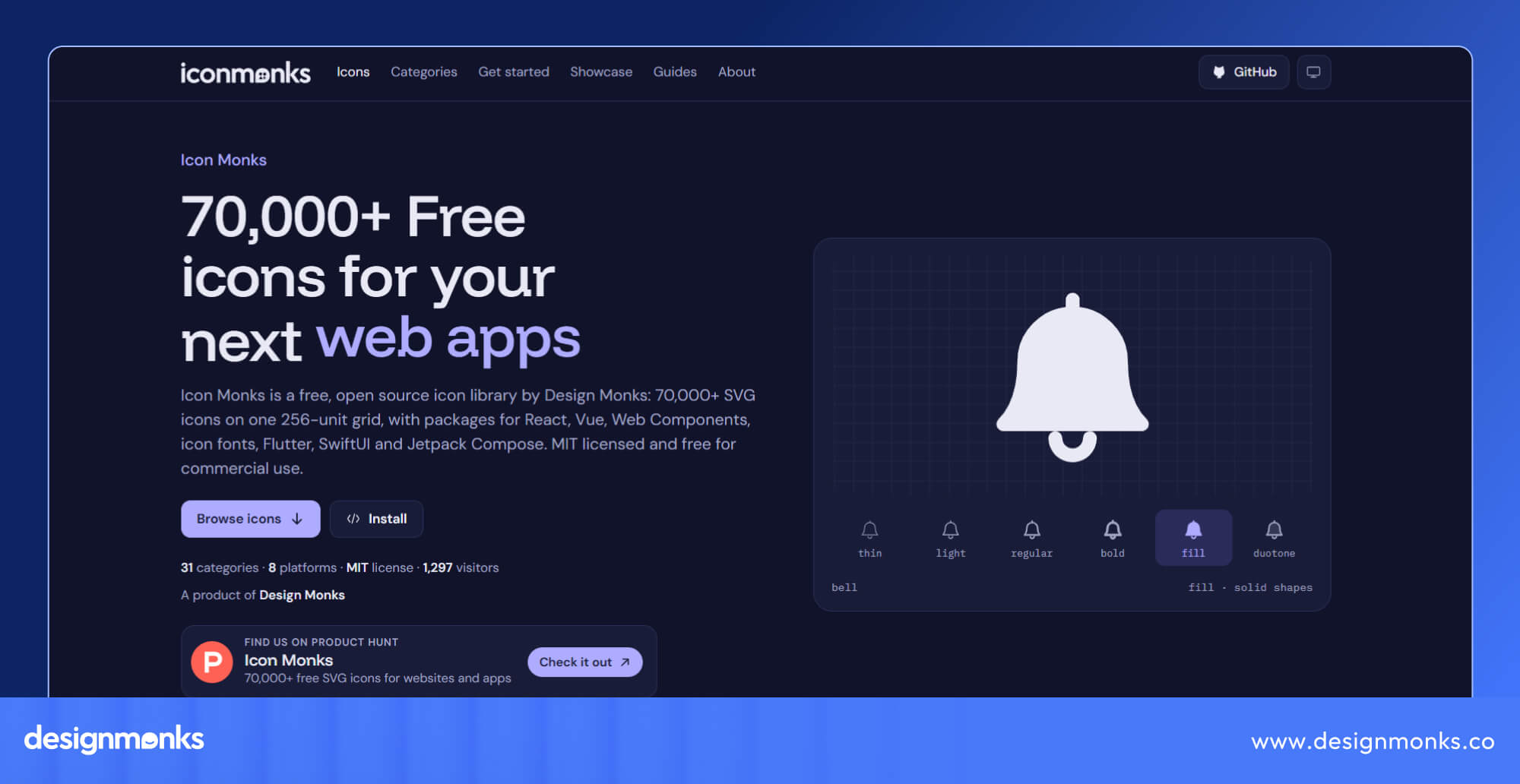
Every icon is available in six visual weights, giving you more control over how it looks in your design. You can download individual icons in different formats or use developer-friendly packages to add icons directly to your code.
Icon Monks also uses the MIT license, which allows free use, modification, and distribution under its terms, including for commercial projects. That means you can explore the collection for personal work, client projects, and business applications without paying a separate licensing fee.
But a large collection is only part of the story. Let's see what else makes Icon Monks worth exploring.
What Makes Icon Monks Different?
Having thousands of icons is helpful. But finding the right one quickly, keeping your design consistent, and using the files in your preferred workflow is just as important, if not more. Let's take a look at how Icon Monks helps with these everyday tasks:
Explore 70,000+ Icons in One Library
Need a shopping cart for an online store, a heart for a health app, or a code icon for a developer tool? Icon Monks brings these options together in one library.
With more than 70,000 icons across 31 categories, you can explore designs for different industries, interface elements, and project needs. You don't have to start from scratch every time you need a new visual element.

This becomes especially useful as your project grows. A simple website might need only a few icons at first. A larger application could require icons for navigation, settings, payments, notifications, reports, and dozens of other actions.
Having a broad collection to explore makes it easier to find suitable options as new screens and features come along. You can also keep your search within the same library and maintain a consistent visual style.
Choose From Six Consistent Icon Weights
An icon's weight affects how it looks and how much attention it attracts. A thin outline can feel subtle, while a bold or filled icon can stand out more clearly. Icon Monks offers six styles to give you that flexibility:
- Thin: Works well for delicate details and subtle interface elements.
- Light: Gives icons a clean appearance without adding too much visual weight.
- Regular: A versatile choice for everyday interface elements.
- Bold: Helps important controls and actions stand out.
- Fill: Useful for selected states, such as an active navigation item.
- Duotone: Uses two tones to add visual interest to icons.
Image: 6 icon weights
The six styles share the same underlying shapes. A regular home icon and its filled version still look like the same symbol. You can change the weight without making your interface feel like it uses icons from different libraries.
For example, you could use regular icons for inactive navigation items and filled versions for selected ones, where matching variants are available. This creates a clear visual difference while keeping the interface consistent.
Download Icons in Multiple Formats
Not every project uses icons in the same way. You might need a scalable vector for a website, a transparent image for a presentation, or a file that works with your preferred design tool.
Icon Monks supports four download formats: SVG, PDF, PNG, and WebP
- SVG is a vector format that can scale without losing sharpness, making it useful for websites and interface design.
- PDF can work well for documents and supports design workflows.
- PNG is useful when you need an image with transparency
- WebP is a modern image format supported by many web workflows.
Image: Download in multiple format
PNG and WebP exports are available at sizes up to 1024 pixels. You can also copy SVG markup directly from the website for supported coding workflows.
The main benefit is flexibility. You can choose a format that fits your project instead of spending extra time converting files or searching for another version of the same icon.
Use Icons Without Paying Licensing Fees
Free icons are great, but it's just as important to know what you're allowed to do with them.
Icon Monks uses the MIT license, which permits users to use, modify, and distribute the icons, including in commercial projects, subject to the license terms. You can use them in personal designs, client work, and business applications without paying a separate icon licensing fee.
For freelancers, startups, and small teams, this makes the library a practical option when working within a budget. You can focus on choosing the right assets rather than worrying about a separate purchase for every icon.
There is one important detail to remember. If you redistribute the original source, you must retain the applicable license notice. Always review the full license terms when packaging or distributing the icons as part of another product.
Now that you know what the library offers, let's look at where you can use it.
Where Can You Use Icon Monks?
Icons aren't limited to buttons or navigation menus. They can help organize information, explain actions, and make visual content easier to understand. Here are four common ways to use Icon Monks in your work:
Website and Landing Page Design
A website needs to communicate its purpose quickly. Icons can help visitors scan the page and understand key information without reading every line.
You can use them in navigation menus, service cards, feature sections, buttons, and contact areas. For example, a business landing page might use icons to highlight its services or explain product benefits. They can keep the style consistent across the page.
Image: landing page design
But make sure to choose icons that support the content rather than adding them just to fill empty space. When used well, they help people find information without distracting them from the main message.
Mobile Apps and SaaS Dashboards
Mobile apps and SaaS products often pack many functions into a small space. Icons help users recognize common actions without needing a long description beside every control.
You might use them for profiles, settings, notifications, search, reports, and navigation.
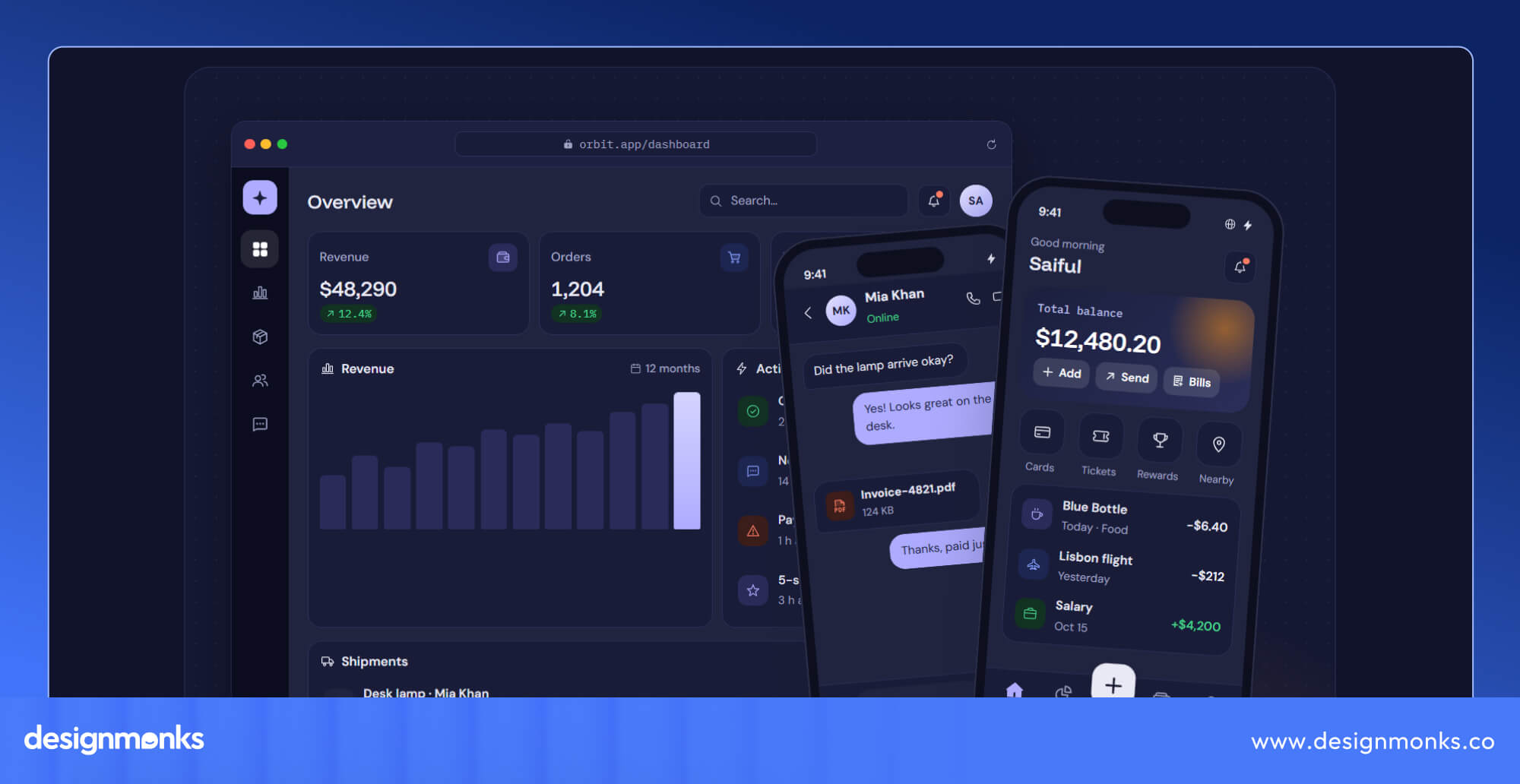
In a SaaS dashboard, consistent icons can help users scan different sections and locate frequently used tools more easily. You can also use different weights to show interface states. For example, a filled icon could identify the active page while regular icons represent the other navigation options.
Just make sure the meaning is clear. For unfamiliar or important actions, add a text label so users don't have to guess what an icon does.
Wireframes and Interactive Prototypes
Wireframes and prototypes help teams understand how a product will work before development begins. Icons make these early designs easier to follow.
A search icon, filter icon, or share icon can show what a control is meant to do. This helps designers explain their decisions and gives stakeholders a clearer idea of how users will move through the interface.
Image: Icons in interactive prototypes
Using suitable icons also makes prototypes easier to review. Instead of leaving empty placeholders that need explaining, you can show the intended action from the start.
Presentations and Marketing Materials
Icons can improve more than digital products. They can also make pitch decks, reports, and product presentations easier to follow.
For example, you could use icons to introduce different product features, organize a process into steps, or highlight key points in a report. They help break up long blocks of text and give readers visual cues.
Image: presentation
Choose a style that matches the rest of your presentation. Duotone icons can add visual interest to marketing materials, while simpler styles may work better for formal reports. The aim is to make information clearer, not to decorate every slide.
How to Find, Download, and Use Icons From Icon Monks
Ready to find your first icon? The process is simple. You can explore the collection, choose a suitable style, and download or copy an icon for your project. Here's what to do step by step:
Image: how to Download
Step 1: Open Icon Monks
Visit Icon Monks and explore the available collection. Start with a category or use the website's search options to narrow your choices.
Step 2: Find the Right Icon
Search for a specific item or action. Simple terms such as "cart," "user," or "search" can help you find relevant options. Think about what the icon needs to communicate before choosing one.
Step 3: Choose a Style
Explore the available weights and select the one that fits your design. You can also adjust size or color where supported. If you're choosing several icons for one interface, try to keep their visual styles consistent.
Step 4: Download or Copy the Icon
Download the icon in your preferred format or copy its SVG markup when that option is available. SVG is a useful choice for scalable interface graphics, while PNG and WebP can suit workflows that need raster images.
Step 5: Add It to Your Project
Import the file into your design tool or use it in your website or application. Icon Monks supports workflows involving tools such as Figma, Sketch, Illustrator, and Framer.
Before moving on, check the icon at its actual display size. Make sure it looks clear, aligns with nearby elements, and has enough contrast against the background.
How Developers Can Integrate Icon Monks Into Their Projects
Icon Monks isn't just a place to download image files. It also offers developer-focused packages and integration options for supported web and mobile platforms:
Add Icons to React and Vue Projects
Developers working with React and Vue can use the available packages to add icons as components. This makes it easier to include icons alongside buttons, navigation items, and other interface elements.
For example, a React project might use an imported home icon inside a navigation component. But the exact package name and import syntax depend on the official implementation, so check the documentation before adding the code to your project.
Use Icons in HTML and Web Projects
Not every website uses React or Vue. Icon Monks also offers web components and an icon font option for other web development workflows.
These options can be useful for plain HTML websites, CMS themes, and projects that rely on different technologies. Choose the method that fits your existing setup and follow the relevant implementation instructions.
Build for Mobile Platforms
If you're developing mobile applications, Icon Monks offers packages for Flutter, Android's Jetpack Compose, and Apple's SwiftUI and UIKit.
These options help developers use the icon collection within their preferred platform. They can also make it easier to maintain a consistent visual style across different versions of a product.
Keep Applications Lightweight
A large icon library doesn't mean your application needs to include every icon. Icon Monks' React and Vue packages support tree-shaking, which can remove unused code during the production build.
For example, your application might use only a few dozen icons from the full collection. With a suitable setup, unused icons can be excluded from the final bundle. The actual result depends on how you import icons and configure your build tools. Follow the package documentation to make sure tree-shaking works as expected.
Tips for Choosing the Right Icons for Your Interface
Choosing the right icons helps people understand your interface and find what they need quickly. Keep these tips in mind to make your design clear, consistent, and easy to use:
- Keep icon styles consistent: Use compatible icon weights throughout your interface. Avoid mixing thin outlines with heavy, unrelated styles. Use variations, such as filled icons, only when they serve a clear purpose, like highlighting a selected navigation item.
- Choose recognizable symbols: Use familiar icons for common actions, such as a magnifying glass for search or a trash can for deletion. If an icon's meaning isn't clear, pair it with a text label so users don't have to guess.
- Check size, spacing, and contrast: Make sure icons remain clear at their actual display size. Leave enough space around them and ensure they stand out against the background. Test them on different screen sizes, especially if your design needs to work on both desktop and mobile.
- Design for accessibility: Provide accessible names for interactive icons so screen readers can explain their purpose. Use visible labels when needed, make buttons easy to tap on mobile devices, and provide clear visual states to help users understand when controls are active or selected.
- Consider the context: Choose icons that match your interface's purpose and audience. Use simple, familiar symbols for essential actions and save decorative icons for places where they add value. Every icon should help users understand the content or complete a task.
FAQs
Are Icon Monks icons free to use?
Yes. Icon Monks offers free icons under the MIT license. You can use them in personal projects, client work, and commercial products, subject to the license terms. Review the license notice to understand the requirements, especially if you redistribute the source files.
Can I use Icon Monks icons in commercial projects?
Yes, you can use Icon Monks icons in commercial projects. The MIT license permits commercial use, so you can include the icons in client websites, paid products, and business applications.
Which file formats are available in Icon Monks?
Icon Monks supports SVG, PDF, PNG, and WebP downloads. SVG is useful for scalable graphics, while PNG and WebP work for raster-image workflows. You can also copy SVG markup directly from the website where the option is available.
Can I use Icon Monks with React, Vue, or Flutter?
Yes. Icon Monks offers developer options for React, Vue, and Flutter, along with packages for Android's Jetpack Compose and Apple's SwiftUI and UIKit. Web components and icon fonts are also available for supported web workflows. Check the official documentation for setup instructions.
Can I change the size and color of the icons?
Yes, Icon Monks supports color and size customization through its available options. The exact controls depend on the format and workflow, so check the website or package documentation before making changes.
Start Your Next Design With Icon Monks
Great websites need more than good-looking icons. They need thoughtful layouts, smooth navigation, and visuals that work together. With 70,000+ free icons, Icon Monks gives you more ways to bring your ideas to life.
Building a new website or refreshing an existing one? Explore Icon Monks for the perfect icons, and let Design Monks help you turn your vision into an engaging, user-friendly website.


.avif)
.avif)
.avif)
.avif)


.avif)
.avif)
.avif)
.avif)







.avif)