
Key Takeaways
- AI speeds up research, ideation, prototyping, and everyday design tasks.
- Human judgment remains essential for quality, usability, and accessibility.
- Choose AI tools based on your team's specific workflow needs.
- Start small, establish clear guidelines, and measure AI's impact.
- Effective AI-powered products prioritize transparency, user control, and trust.
A product idea can take days to become a working prototype, but what if your team could explore it in hours? AI integration in digital product design is making this possible by speeding up research, generating interface concepts, and reducing repetitive design tasks.
From turning text prompts into UI layouts to analyzing customer feedback, AI is changing how designers approach everyday challenges. Teams can now explore more ideas, test different solutions, and spend less time on manual work.
But faster design doesn't always mean better design. The real value comes from knowing where AI can help and where human judgment still matters. Read on to explore practical workflows and the key considerations for bringing AI into digital product design.
What AI Integration in Digital Product Design Means
AI integration in digital product design means two things. First, designers use AI tools to make their work faster and easier. Second, they add AI-powered features to apps, websites, and software. Digital product design covers the full process, from understanding user needs to creating the final design. These two uses include:
- Using AI for design work: Tools like ChatGPT and Figma AI help designers research ideas, explore concepts, and create prototypes.
- Adding AI features to products: These include chatbots, personalized content, and smart suggestions that help users complete tasks.
Unlike physical products, digital products live on screens and can be updated anytime. For example, a chair or phone case depends on materials and physical shapes. But an app or website can change as users' needs grow. AI can help teams make these changes faster.
Why Design Teams Are Adopting AI Now
Design teams are adopting AI because it helps them work faster, explore more ideas, and make better use of their time. Tasks like summarizing user interviews, creating early concepts, and building prototypes can take hours or even days.
AI tools can speed up these steps and give designers more time to focus on user needs and design decisions. The growing use of AI also reflects a shift in the industry.
Designers are already using tools like ChatGPT and Figma AI in their daily workflows. Teams want to keep up with this change while delivering products faster and responding to user feedback.
However, speed is only part of the reason. AI helps teams test more options, spot patterns in user data, and explore solutions before investing in full development. Human judgment still matters, but AI makes the design process more efficient.
Where AI Fits in the Digital Product Design Process?
AI can support almost every stage of digital product design, from early research to developer handoff. It helps teams handle repetitive tasks, explore more ideas, and catch problems earlier.
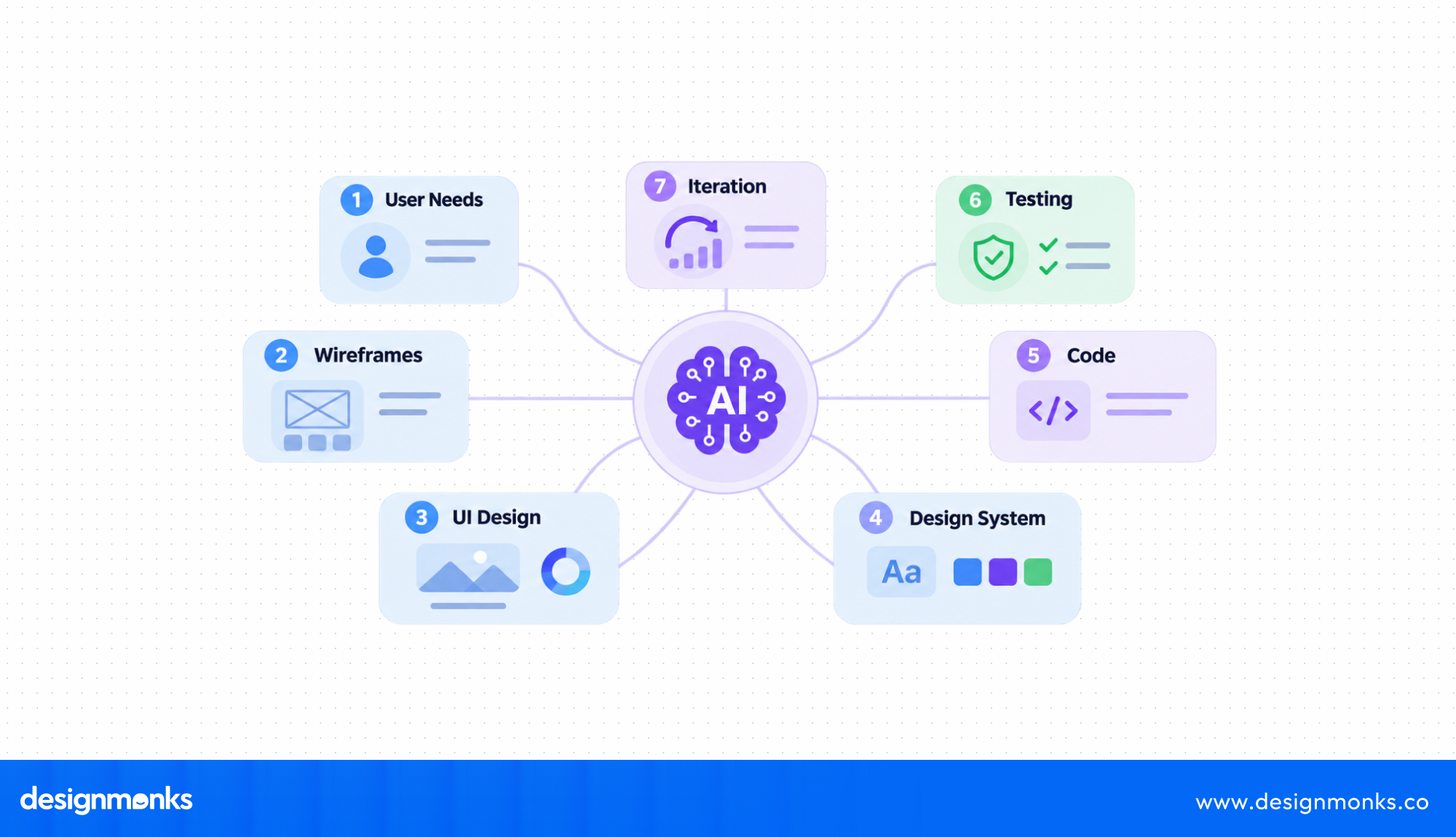
However, designers and researchers still need to check the results and make important decisions. Here is how AI fits into each stage:
Let's look at what AI can do at each stage and where human input remains important:
AI for User Research and Insight Synthesis
User research often produces a lot of information from interviews, surveys, reviews, and usability sessions. AI tools like Dovetail, Maze, and ChatGPT can summarize this data, group similar feedback, and highlight common user problems.
For example, if several users say they struggle to find the checkout button, AI can group those comments under a common navigation issue. It can also help researchers identify user patterns and behavioral groups.
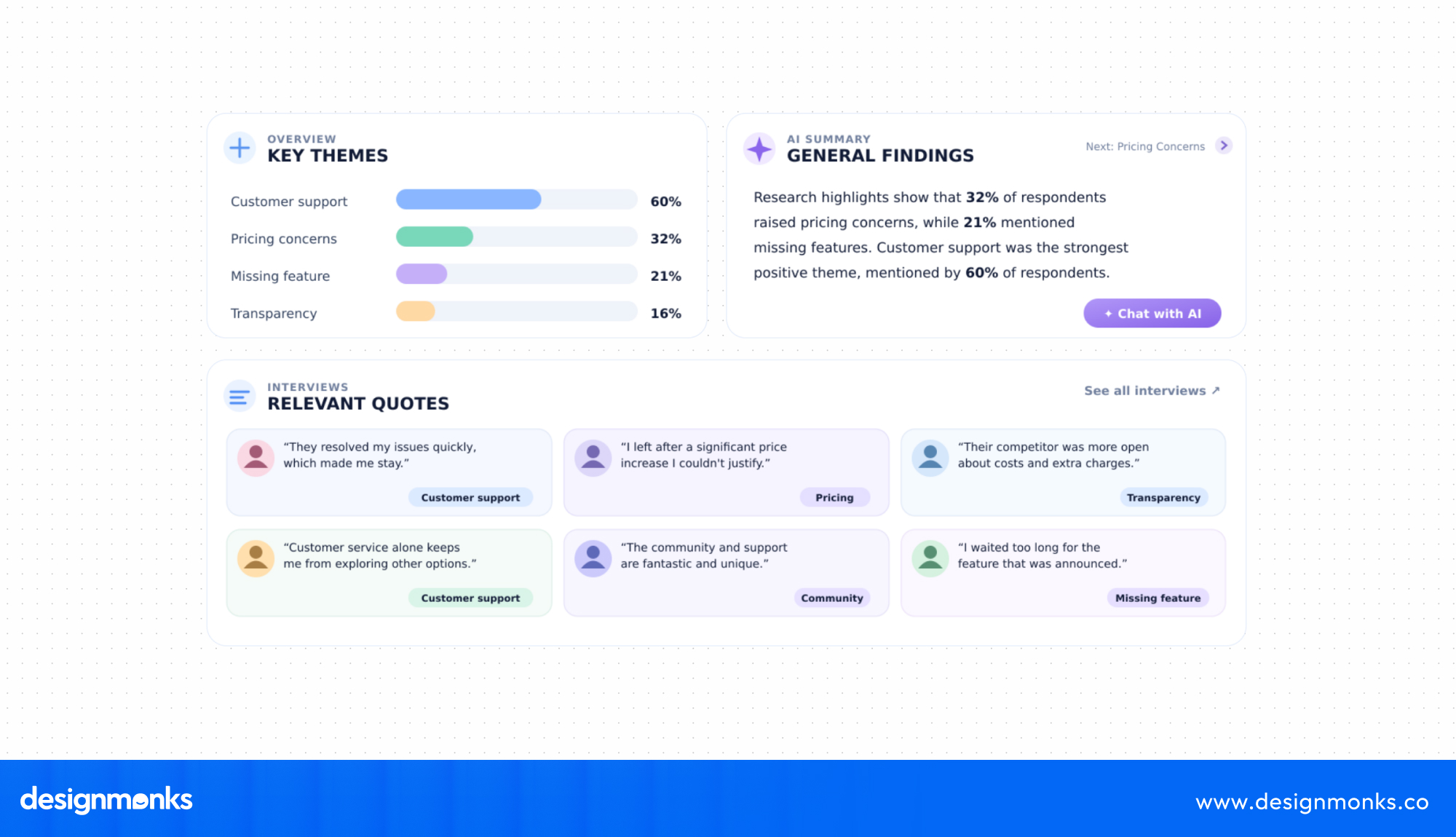
However, AI can miss context or misunderstand feedback. Researchers must review the original responses, confirm the patterns, and decide which findings deserve attention. AI can organize research, but it cannot replace a researcher's understanding of users.
AI for Ideation and Concept Exploration
Starting with a blank page can slow down the design process. AI helps designers get started by generating possible ideas, user flows, layouts, and design concepts from simple prompts.
Tools like FigJam AI and ChatGPT can help a team explore different ways to solve a problem. For example, a designer creating a food delivery app might ask AI to suggest ways to simplify the ordering process.
It can produce several flow ideas for the team to discuss.
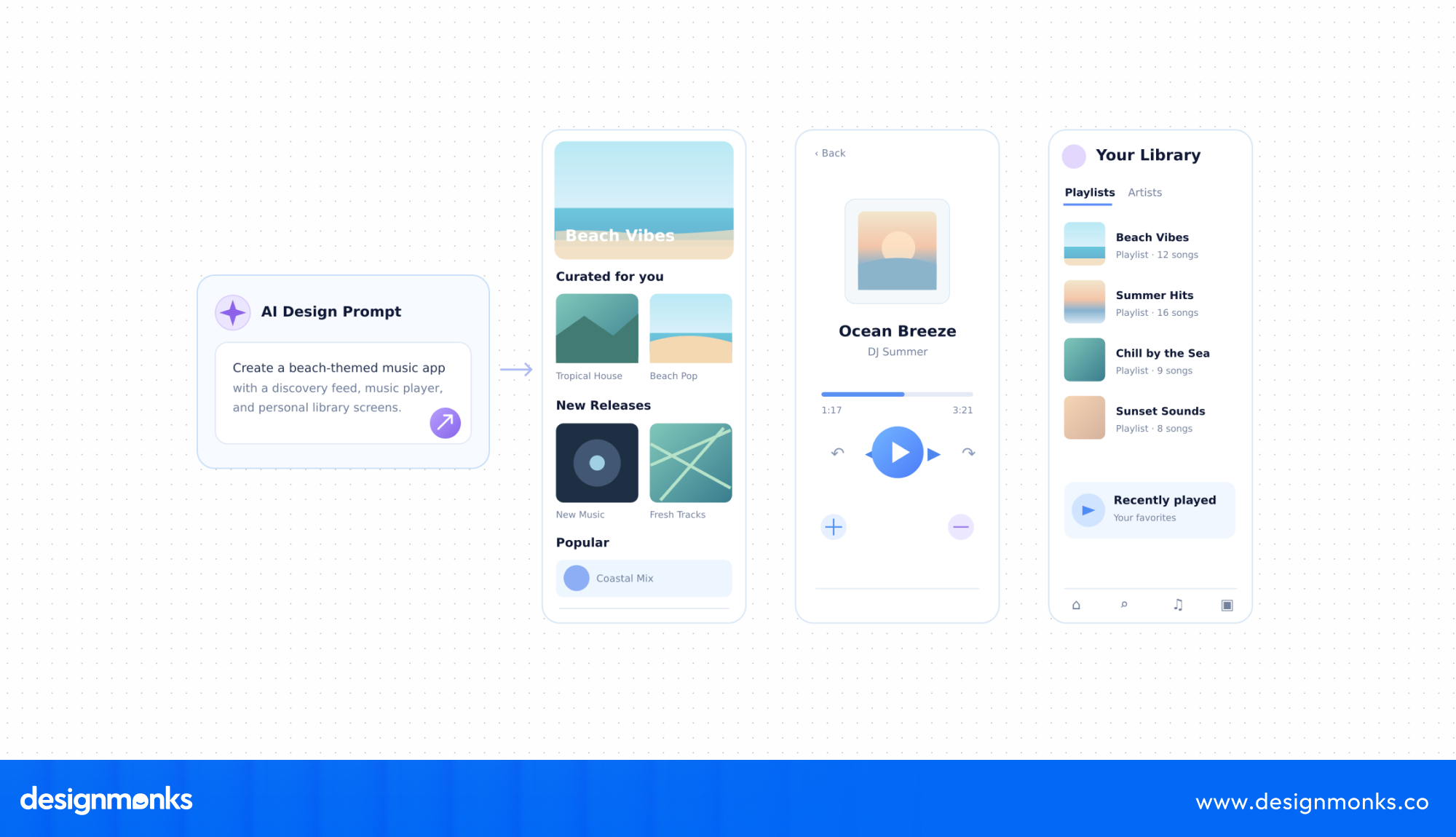
These suggestions are starting points, not finished solutions. Designers need to compare the options, consider user needs, and remove ideas that are confusing or difficult to build. The goal is to explore more possibilities while keeping human judgment at the center.
AI for Wireframing and Rapid Prototyping
Wireframes show how a product's screens and elements will be arranged. AI tools can speed up this stage by turning written prompts or screenshots into editable designs. Tools like Uizard, Galileo AI, and UX Pilot help designers create early screen layouts and interactive prototypes.
For example, a designer can describe a login page with email and password fields, a sign-in button, and a password recovery link. An AI tool can generate an initial layout from that description.
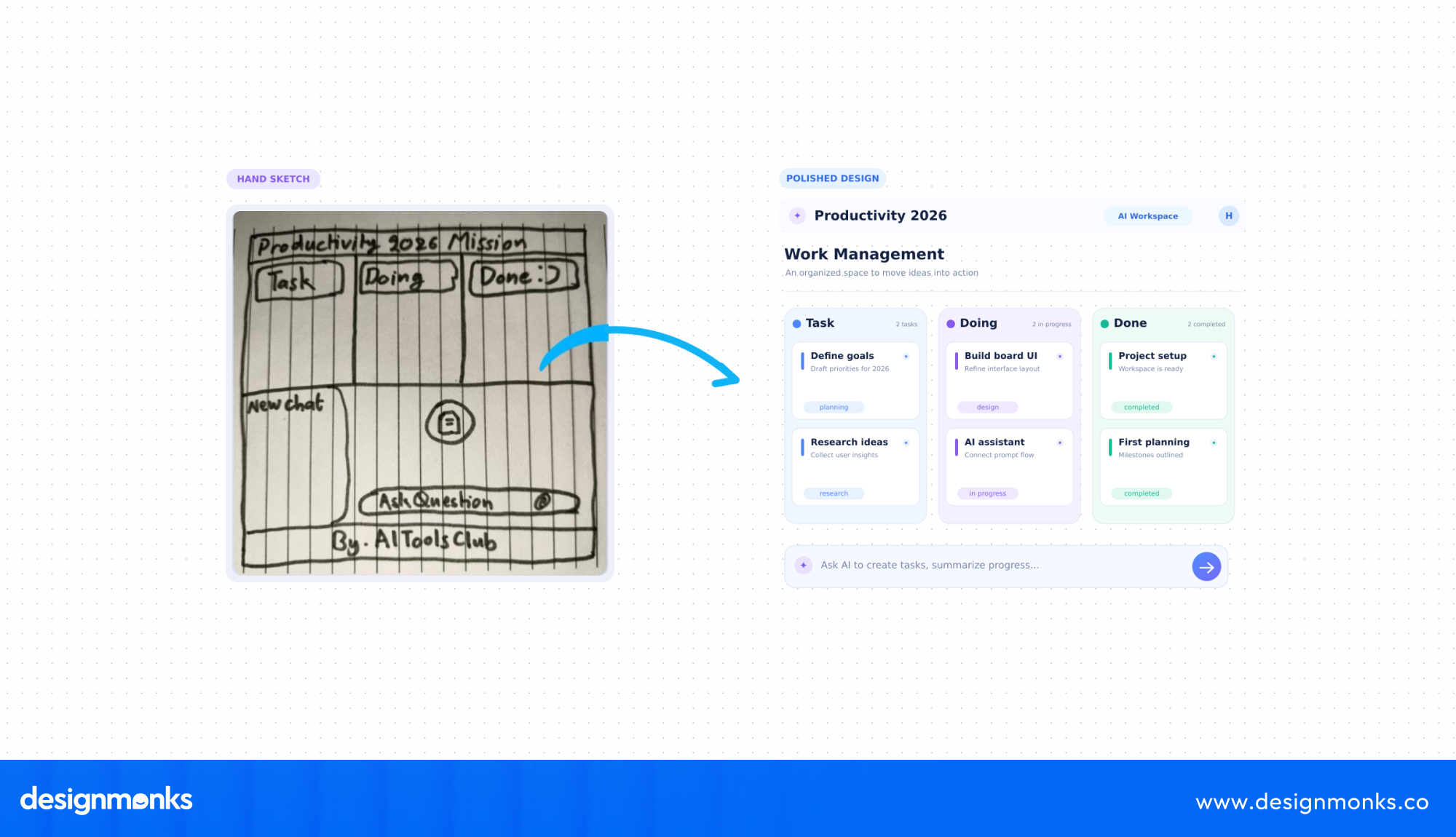
The result still needs review. Designers may need to fix spacing, adjust layouts, improve visual hierarchy, and make sure every screen supports the intended user flow.
AI makes rapid prototyping easier, but it does not guarantee a usable design.
AI for UI Design and Design System Consistency
AI can help designers create UI screens faster, but the results need to follow the product's design system. A design system includes reusable components, colors, typography, spacing rules, and naming standards.
Tools like Figma AI can support this work when designers provide clear design rules and approved components.
For example, without design system guidance, AI might create three different button styles across the same app. When it uses the approved components and design tokens, the screens are more likely to follow consistent colors, spacing, and styles.
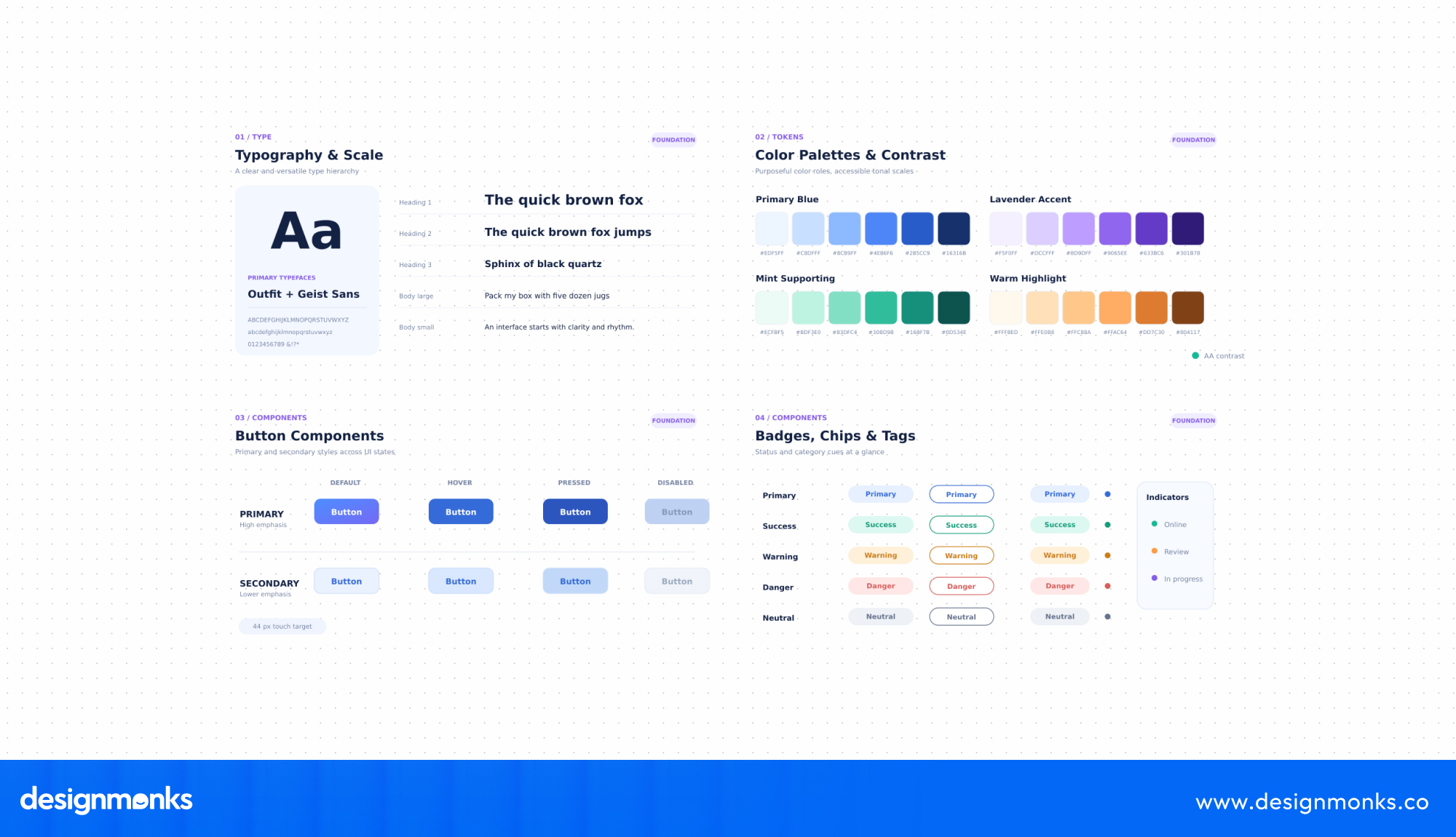
This makes a big difference when a product has many screens or multiple designers. AI can speed up design work, but teams must set clear rules and review every output to keep the product consistent.
AI for Usability Testing and Accessibility Checks
AI can help teams find possible usability and accessibility problems before a product goes live. Tools like Maze can analyze test sessions and highlight where users struggle. Accessibility checks can also flag issues such as low color contrast, missing image descriptions, and unclear form labels.
For example, a contrast checker can identify text that does not meet the WCAG color contrast guidelines. AI can also help review page content and suggest clearer labels or instructions.
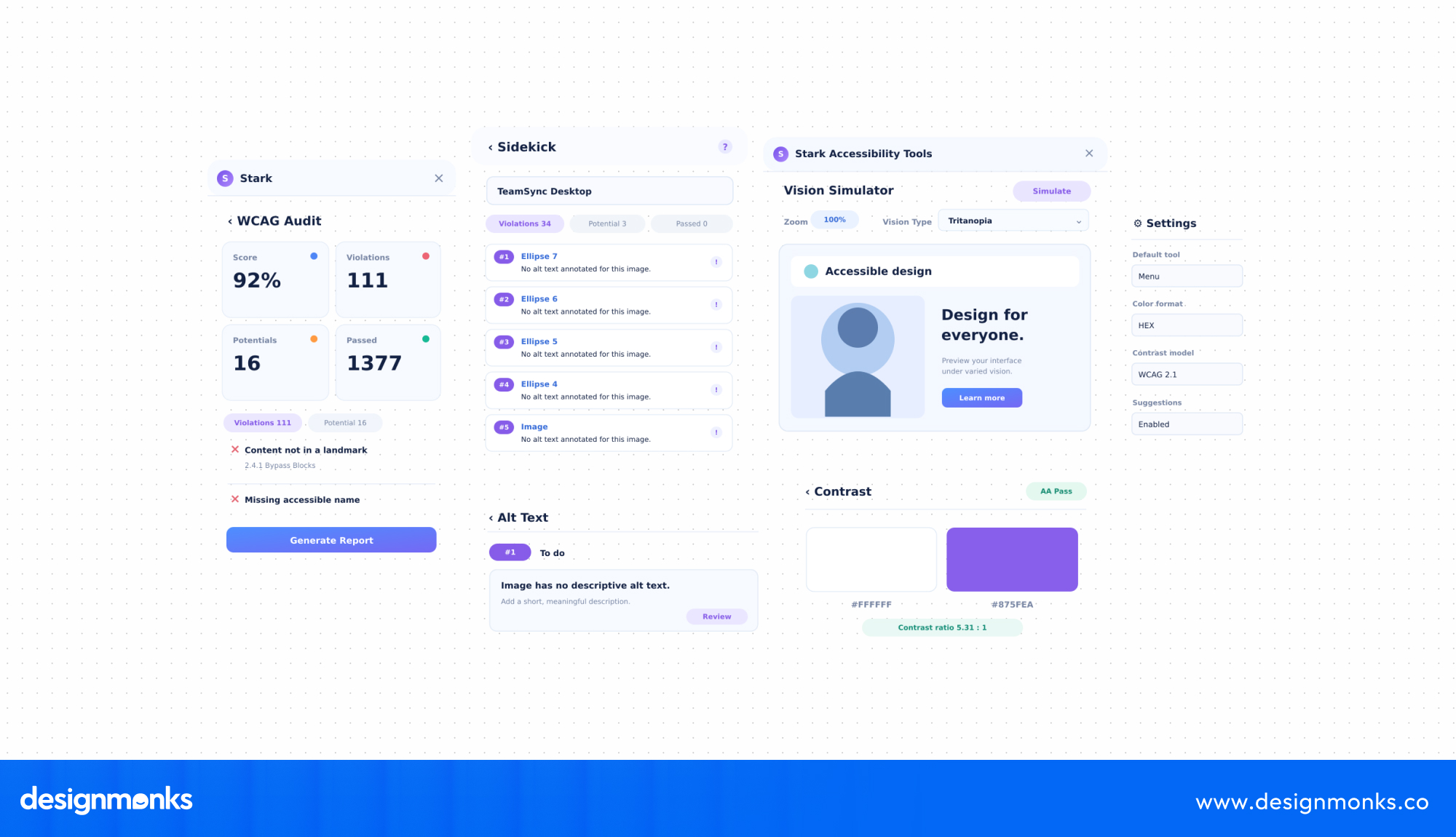
These checks help teams catch common issues early, but they do not replace testing with real users. A tool may flag a contrast problem, but it cannot fully understand whether a person with a disability can complete a task comfortably.
Human review and real-user feedback are still essential.
AI for Developer Handoff and Design QA
Once the design is ready, developers need clear instructions to build it correctly. AI can help prepare design specifications, document components, explain interactions, and suggest code.
It can also help teams compare the finished product with the approved design to find missing elements or layout differences.
For example, AI-assisted tools can help identify incorrect spacing, inconsistent button styles, or missing interface elements during design QA. They can also make it easier to share component details and design decisions with developers.
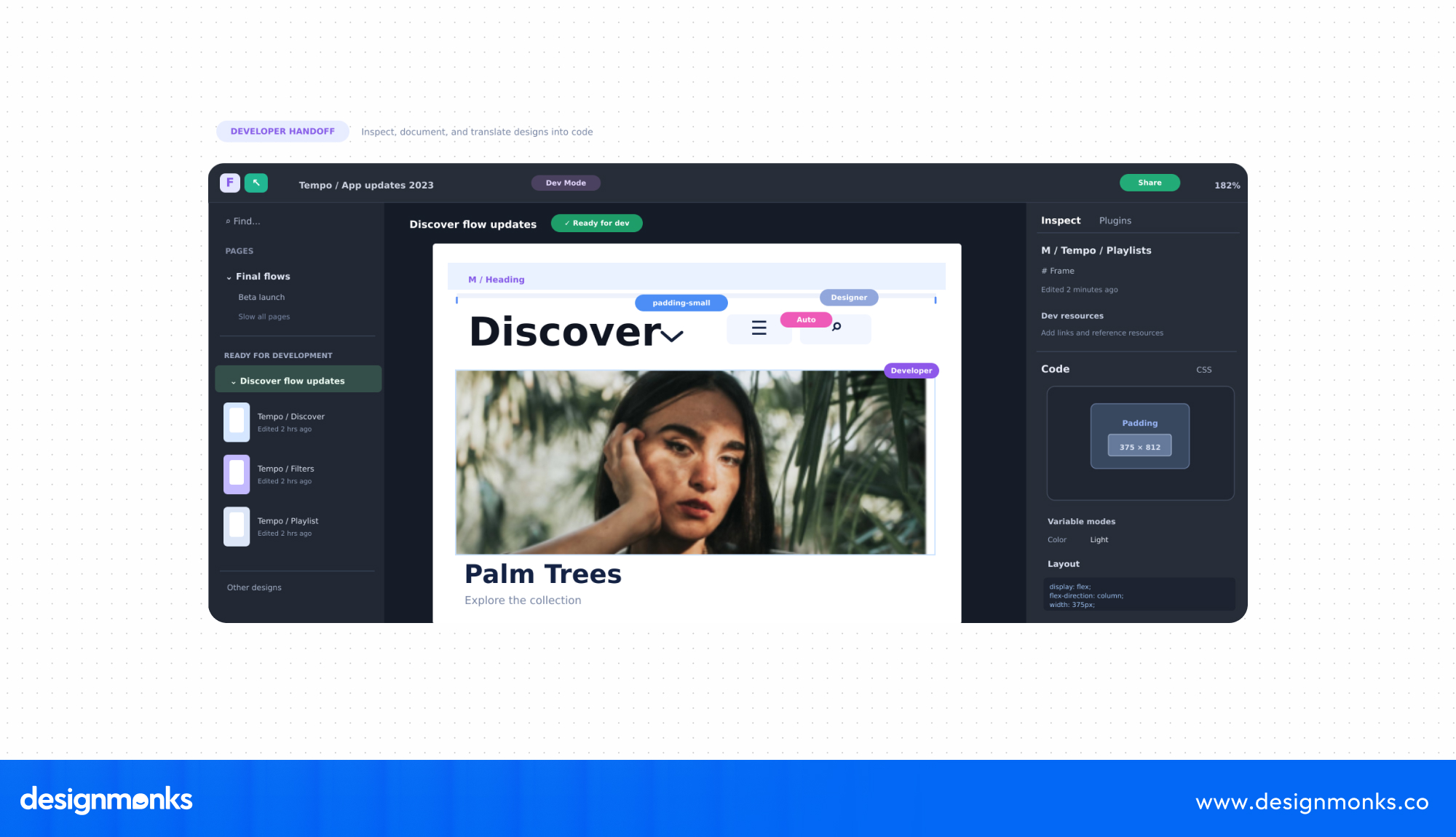
However, generated specifications and code still need technical review. Developers must check whether the code works, follows project standards, and performs well across devices. Designers should also review the built product to make sure the final experience matches the intended design.
AI can reduce manual work across the design process, but people remain responsible for research accuracy, design decisions, accessibility, and the final product quality.
Best AI Design Tools by Workflow Stage
These tools support different parts of the design process. The list is organized by use, not ranking. Features may change, so check each tool before choosing it:
User Research
- Dovetail: Organizes interviews and finds common feedback patterns. Researchers still need to verify the insights.
- Maze: Tests prototypes and summarizes user feedback. It cannot replace direct user conversations.
- ChatGPT: Summarizes research notes and helps prepare questions. Always check its findings for accuracy.
Ideation
- FigJam AI: Groups brainstorming notes and suggests ideas. Results depend on clear prompts and human input.
Wireframing and Prototyping
- Uizard: Turns text prompts and sketches into screen designs. The output often needs editing.
- Galileo AI: Creates quick UI concepts from text prompts. Complex layouts may need manual work.
- UX Pilot: Generates screen and user-flow ideas. Designers still need to refine the layouts.
UI Design and Handoff
- Figma AI: Helps create and refine designs within Figma. Consistent results depend on a well-organized design system.
The best choice depends on your team's needs, but always review AI-generated work before using it in a final product.
How to Integrate AI Into Your Design Workflow, Step by Step
You do not need to change your entire design process to start using AI. Begin with a few simple steps and expand as your team gets comfortable:
Step 01: Find Tasks Where AI Can Help
Review your team's regular tasks and identify which ones take the most time. Focus on work that repeats often, such as summarizing research, creating first-draft screens, or writing design notes. Choose two or three tasks to try with AI.
Step 02: Start Small With Your Existing Tools
Test AI in one part of your workflow first. For example, if your team already uses Figma, try Figma AI or FigJam AI. This makes it easier to get started without learning several new tools. Run the test for four to six weeks.
Step 03: Set Clear Rules for Using AI
AI-generated work needs human review to maintain quality. Set a few basic rules:
- Use clear prompts: Save useful prompts and include your brand and design guidelines.
- Review the results: Assign someone to check AI-generated work before approval.
- Protect private data: Never share sensitive user or business information with public AI tools.
- Check important work: Always review research findings, accessibility results, and final designs.
- Label AI output: Mark AI-generated files so team members know to review them carefully.
Step 04: Check Whether AI Is Making a Difference
Compare your team's work before and after using AI. Track a few simple measures:
Use data from your last two sprints as a starting point. If AI helps your team work faster but also increases mistakes and rework, the process needs improvement.
Designing AI-Powered Features Inside Your Product
So far, we have looked at how designers use AI to do their work. Now, let's look at the other side, adding AI features that users interact with directly.
Before adding AI, ask one question: Does this feature really need AI? If a simple filter or fixed rule can solve the problem, use that. AI makes sense when it helps users complete tasks more easily.
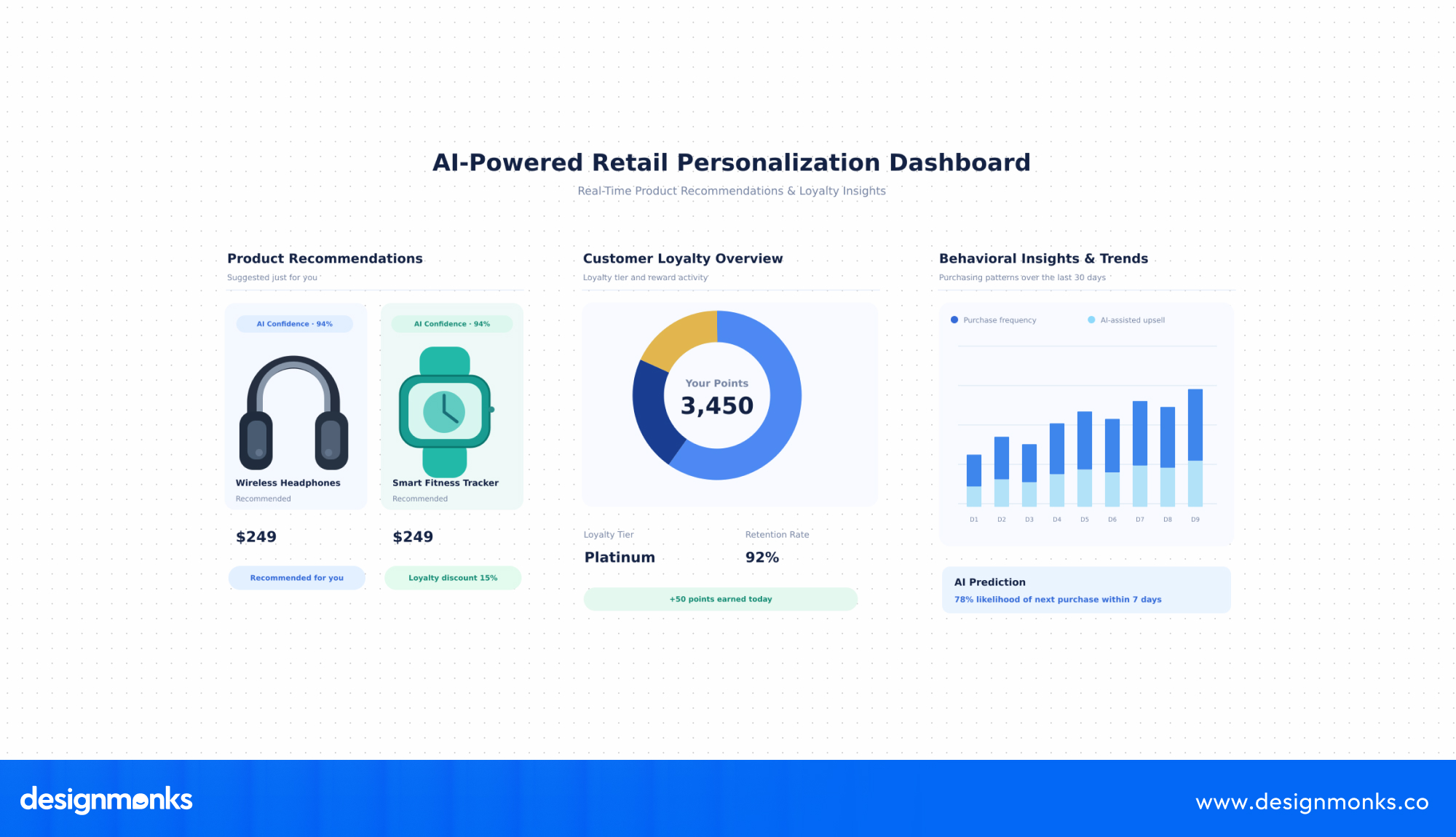
Here are some common AI-powered features you can use in a product:
- Conversational interfaces: Chat assistants help users find information or complete tasks through simple conversations.
- Personalization: AI suggests content based on user interests and behavior. Users should still be able to change their preferences.
- Predictive suggestions: AI recommends the next useful action without forcing users to follow it.
- Agentic UX: AI completes tasks on a user's behalf. Show what it plans to do and ask for approval before important actions.
- Transparency: Explain when AI is being used and how it makes suggestions.
- User control: Let users edit, reject, or undo AI-generated results.
Businesses looking to build AI-powered digital products can also work with a specialized design team. Design Monks offers AI product strategy and design, AI UX/UI design, conversational AI interfaces, and human-AI interaction design.
They also support UX research, prototyping, and design systems to help businesses create AI experiences that are useful, clear, and easy to navigate. The goal is to make AI helpful while keeping users informed and in control.
Limits, Risks and Ethical Considerations
AI can make design work easier, but it also brings risks. Teams need to understand these limits before adding AI to their workflow:
- Bias and fairness: AI can repeat unfair patterns from its training data. Test results with different user groups.
- Data privacy: Avoid sharing private user or business information with unapproved AI tools.
- Generic results: AI can produce designs that look similar. Add original ideas and brand details.
- Incorrect research findings: AI may invent patterns or quotes. Always check the original research.
- Accessibility issues: AI-generated designs may miss WCAG requirements, such as proper contrast and clear labels.
- Copyright and licensing: Check whether generated content and assets can be used commercially.
- Over-reliance: Depending too much on AI can weaken design skills. Keep practicing core design tasks.
When should you avoid AI? Avoid using it for sensitive user data, final accessibility approval, and legal or medical content unless qualified people can verify every result.
Real-World Examples and Mini Case Studies
Adyen, a global fintech company, wanted to help its teams turn product ideas into working prototypes faster.
What they did: Adyen introduced Figma Make in a four-hour design sprint. Around 30 participants worked on 10 real product projects. AI helped create wireframes and prototypes that usually took several days.
What people did: Teams first defined user problems, mapped journeys, and selected the best ideas. Designers and developers then reviewed the AI-generated prototypes.
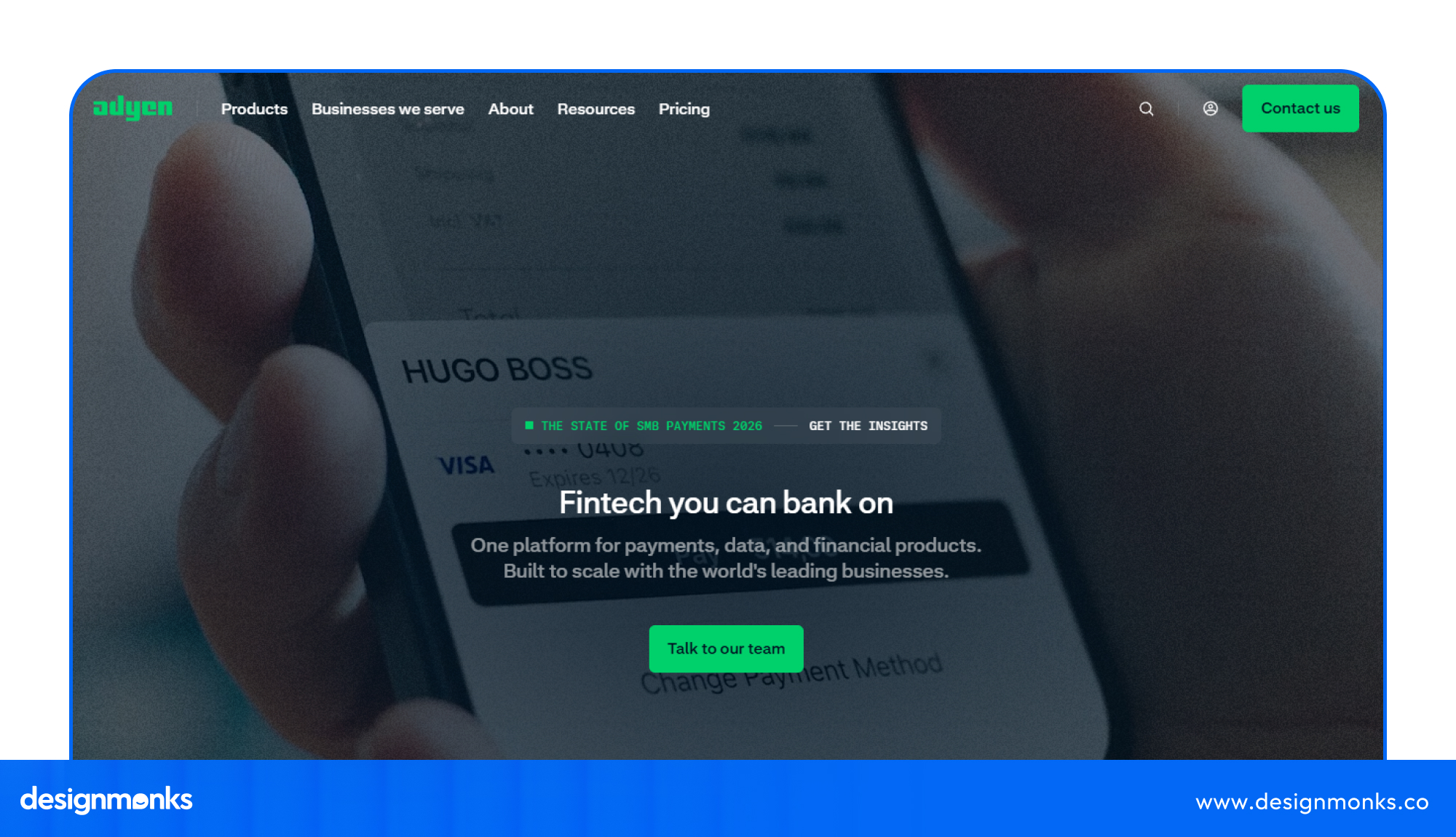
The result: Work that normally took four to five days was completed in one afternoon. Participants estimated that the process was 10-20 times faster and rated their experience 5.44 out of 7.
The important lesson is that AI handled much of the early design work, while people guided the process and checked the results.
Where AI in Digital Product Design Is Heading
AI will continue to change how teams create and improve digital products. Some key changes to watch include:
- Less manual work: Designers will spend less time on repetitive tasks and more time making important design decisions.
- More AI-led tasks: AI will handle several steps, such as research, drafting, and testing, with human approval.
- Faster design-to-code: AI will make it easier to turn design ideas into working interfaces.
- Closer teamwork: Designers will need to guide AI tools, review their output, and make sure the final product meets user needs.
Teams that combine AI speed with human judgment will be better prepared for these changes.
FAQs
Will AI replace product designers?
No, AI will not replace product designers. AI can create drafts and automate routine tasks, but it cannot fully understand user needs or make every design decision. Designers who know how to use AI can work more efficiently.
Which AI tools are useful for digital product design?
Different AI tools are useful for different stages of digital product design. Dovetail and Maze help with user research and testing. Uizard, Galileo AI, and UX Pilot support wireframing and prototyping. Figma AI helps with UI design.
How can I start using AI in my design workflow?
Start with two or three repetitive tasks. Test AI tools, set clear review rules, and compare the results with your usual process.
Is AI-generated design accessible?
Not automatically. AI may miss contrast issues, unclear labels, or other accessibility needs. Review designs against WCAG guidelines and test them with real users.
How is AI-assisted design different from traditional design?
Traditional design relies more on manual work at each stage. AI-assisted design uses AI to create drafts and speed up tasks, while designers review and improve the results.
Conclusion
AI integration in digital product design is changing how teams research, create, test, and improve digital products. It helps designers save time, explore more ideas, and build better user experiences.
But AI alone cannot guarantee good design. Human judgment is still needed to understand users, make the right decisions, and check the final results.
Start with a few simple tasks, choose tools that fit your workflow, and review every output carefully. The best results come when designers and AI work together to create products that are useful, accessible, and easy to use.